


Knowledge Required: Strong understanding of KQL concepts
Tools required: Microsoft Sentinel
This posts assumes that you have the Syslog table enabled in your Sentinel Workspace.
In previous blog posts we’ve gone through detecting suspicious credential usage via more traditional ‘factual’ query rules. Purely factual query rules, that don’t account for if the detected behavior is anomalous, usually present the following problems for SOC operations:
- The query will often require a lot of tuning for ‘known behaviors’ and can be time consuming to identify correct tuning parameters
- Factual rules can commonly give little context into if the events detected are normal.
Today, we’ll introduce native KQL anomaly detection algorithms to help detect suspicious increases in user session behavior, indicating potentially compromised accounts. Anomaly detection is great for this as any malicious behavior should always cause a deviation from the ’normal’ baseline of behavior. We just need to write a query to pick up on it. Today we’ll be doing that against Linux Syslog data. If you want to just skip to the the fully query, click here.
Engineering our query logic
In today’s quey, we’re going to use the auth.log within Linux to get session information. The advantage of using this log is that this monitors local and remote user session creation, giving us as much data as possible for our anomaly detection.
The logic will work in the following way
- Get all new sessions being fed into the
Syslogtable across the whole environment - Count how many logins we see in a certain time frame (recommended 1hr)
- Make this into a series of data
- Identify from one point to the next if the variation is anomalous
- We then identify all users that have signed in within time frames that are identified as containing anomalies.
The KQL function that allows us to detect anomalies is series_decompose_anomalies() which provides some great visual examples of how it works. I recommend reading this now if you want to get a deeper understanding of what it’s capable of.
Technical breakdown of the rule
We will take a deep dive to understand how each point above is achieved.
Getting our raw data
Firstly, we need to get our raw data for new user sessions created within the environment. As we will use this data more than once, we will ‘cache’ it in a variable called RawData:
let RawData=Syslog
    | where Facility == "auth"
    | where SyslogMessage startswith "New session";
Standardizing the data
To be able to accurately detect anomalies, the volume of session creations needs to be divided into equal time frames, so we can identify any timeframes where an anomaly occurred.
This is achieved through a process of binning, and can be seen in the statement below:
RawData
| summarize C=count() by bin(TimeGenerated, BinTime) // BinTime equals 1h
| summarize Counts=make_list(C), Times=make_list(TimeGenerated)
We are counting by how many sessions we have seen per hour. We then use the second summarize to convert this into lists. This is our ‘series’ of data.
Our output so far:
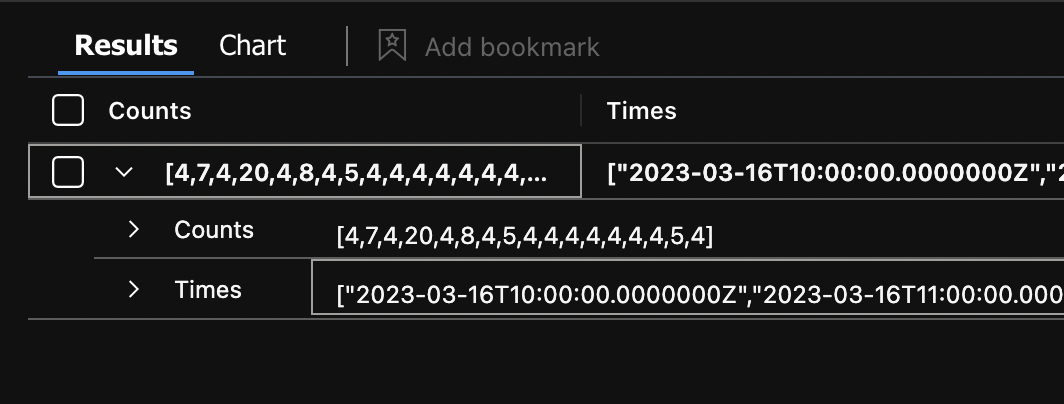 Two arrays are created (Counts and Times) and the values are linked by their corresponding position in the array. I.e, in the first timestamp, we saw 4 sessions because they are both position 1 in their relevant array.
Detecting anomalies within the data
Continuing with our above data, we can add the magic of anomaly detection. Following our series_decompose_anomalies() documentation, we pass the function the required parameters in order:
- Our data points
- How sensitive we want the anomaly detection to be between 1-3
- Our trend method (we use
linefit) for linear regression, which should serve well for determining if each value is anomalous compared against other data in the series - Testpoints. This is the number of data points we may want to exclude at the end of our data. We want to do anomaly detection across the complete data set, so we use
-1to denote this.
In our query, it should now include:
| extend (Flag, Score, Baseline) = series_decompose_anomalies(Counts, AnomalySensitivity, -1, 'linefit') // Anomaly Sensitivity can be a numerical value 1-3
| mv-expand Flag, Times
| extend Times=todatetime(Times)
| where Flag > 0 // flag determines an anomaly has occurred
This will create us 3 series of data for each data point:
- Flag:
1or0to indicate if the data point was identified as anomalous - Score: A numerical representation of how anomalous it was
- Baseline: This is helpful in debugging and is a numerical value of what the baseline was at that given data point
The main take away from this section is that we’ve identified data points where the Flag > 0 because these are considered anomalous.
Finding affected users where anomalies have occurred
One of the reasons we’ve stored our data in a variable named RawData is because we will need to use the same data to lookup active users in times frames where anomalies are detected. This can be achieved with the join operator to run an additional query back on the same RawData:
| join (RawData
    | extend User=extract("of user (.+).", 1, SyslogMessage)
    | extend User=tostring(User)
    | summarize Sessions=count() by bin(TimeGenerated, BinTime), User
    // list will be ordered to we can mv-expand these later to get a specific breakdown of what accounts
    // signed in during the anomaly
    | summarize Users=make_list(User), SessionCount=make_list(Sessions) by TimeGenerated
    | project-rename Times=TimeGenerated
    ) on Times
With a list of users from the above, we can then use mv-expand to create a individual row for any user affected within the timestamp:
| mv-expand SessionCount, Users
| extend User=tostring(Users) // we have expanded so one entry per field
| extend GroupedByTime=BinTime
| extend SessionCount=toint(SessionCount)
Resulting in:

These results tell us:
- Time frames where the anomalies session counts where identified
- The users involved in these
- How many sessions the user had
Voila! We’ve broken down each step in the query, and have used anomaly detection to help us get more reliable detection of truly suspicious activity.
Extending this further
To enhance the strength of our detection, we can introduce some additional factual logic to help filter out behavior that is not likely to be suspicious. We can have a minimum threshold before we consider activity suspicious, by adding the following to the end of the query:
| where SessionCount > 5
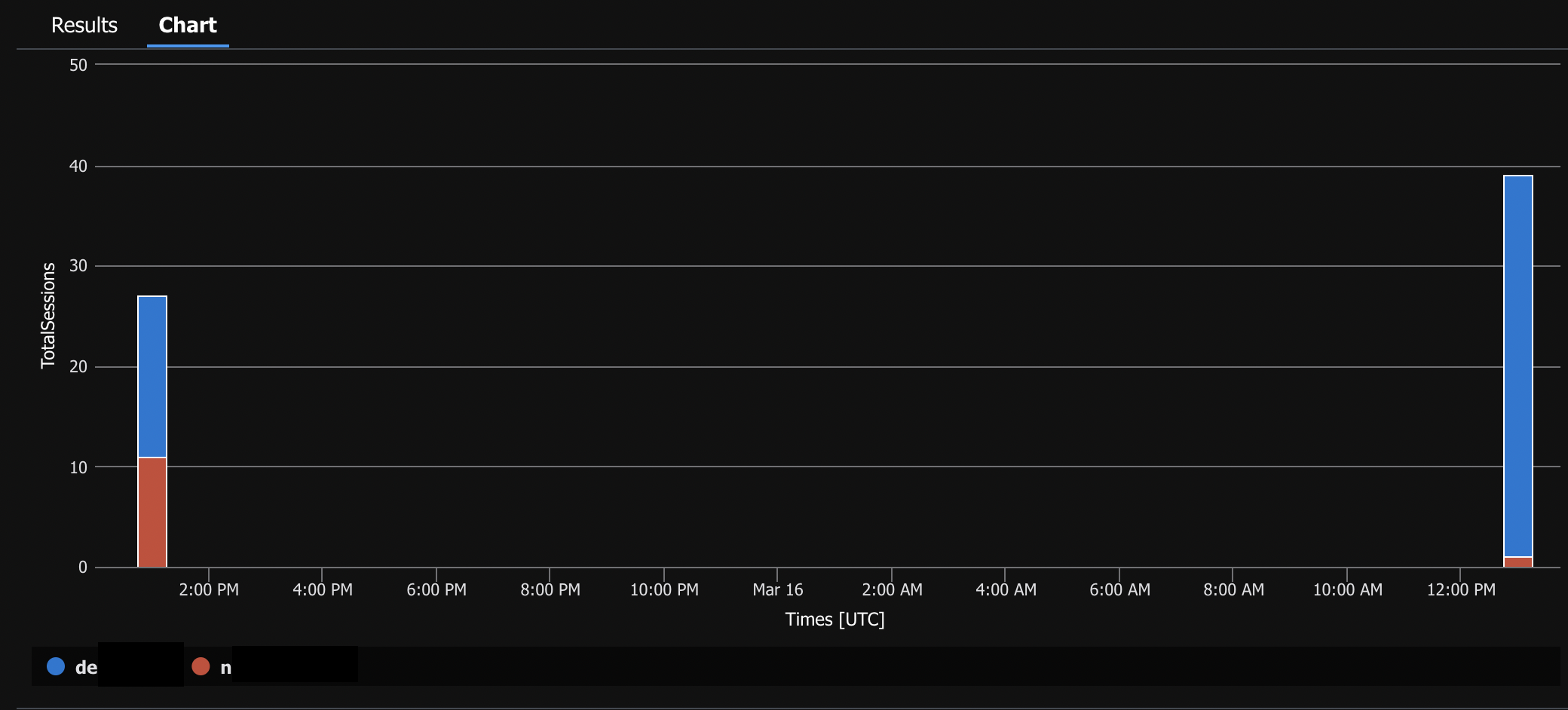
While our current query output is helpful, it could be better presented as a chart to make it clearer when suspicious behavior has occurred. This can be done simply by adding a few extra lines to the end of the query:
| make-series TotalSessions=sum(SessionCount) default=0 on Times step 1h by User
| render columnchart
Finished Query:
This query comes with some adjustable parameters:
BinTimeuse this to control the bin size for the data series.Anomaly Sensitivityuse this to control how big or little the anomaly should be before detection. Increase this value if you are getting repeated false positives.MinimumSessionsPerBinTimehow many sessions should occur within the bin time before we consider it malicious. Adjust this against normal behavior in the environment.
let BinTime = 60m;
let AnomalySensitivity=1.5; // 0-3
let MinimumSessionsPerBinTime=5; // tune as required
// get our session counts where we have anomalies. Reference these by time
let RawData=Syslog
    | where Facility == "auth"
    | where SyslogMessage startswith "New session";
// Use Raw Data to Get anomalies
RawData
| summarize C=count() by bin(TimeGenerated, BinTime)
| summarize Counts=make_list(C), Times=make_list(TimeGenerated)
| extend (Flag, Score, Baseline) = series_decompose_anomalies(Counts, AnomalySensitivity, -1, 'linefit')
| mv-expand Flag, Times
| extend Times=todatetime(Times)
| where Flag > 0 // flag determines an anomaly has occured
// then join back on our data get which users where actually anomalous
| join (RawData
    | extend User=extract("of user (.+).", 1, SyslogMessage)
    | extend User=tostring(User)
    | summarize Sessions=count() by bin(TimeGenerated, BinTime), User
    // list will be ordered to we can mv-expand these later to get a specfiic breakdown of what accounts
    // signed in during the anomaly
    | summarize Users=make_list(User), SessionCount=make_list(Sessions) by TimeGenerated
    | project-rename Times=TimeGenerated
    ) on Times
| mv-expand SessionCount, Users
| extend User=tostring(Users) // we have expanded so one entry per field
| extend GroupedByTime=BinTime
| extend SessionCount=toint(SessionCount)
| where SessionCount > MinimumSessionsPerBinTime
// if you want a colum graph showing the breakdown of anomalous sessions, uncomment below. May not render if not enough data points.
//| make-series TotalSessions=sum(SessionCount) default=0 on Times step BinTime by User
//| render columnchart
EOF
