


Read time: 15 minutes
Repository Link: BitBucket
Authapp was a project used to gain a better understanding of how web components interact with each other. The main target was to build an API which supported authentication, Role Based Access Control (RBAC) with a front end built in HTML and Javascript.
The project is built on the following technologies:
- HTML, CSS
- MongoDB
- Python
- Flask
An interactive demo is available by building the docker container provided in the repository.
Post contents
| Title | Description |
|---|---|
| Authentication | A breakdown of how authentication operates |
| Front End | Front end development |
| API | |
| Outlining Role Based Access Control | How RBAC is achieved |
| Available API endpoints | Available API endpoints |
| Conclusion | Thoughts and feelings |
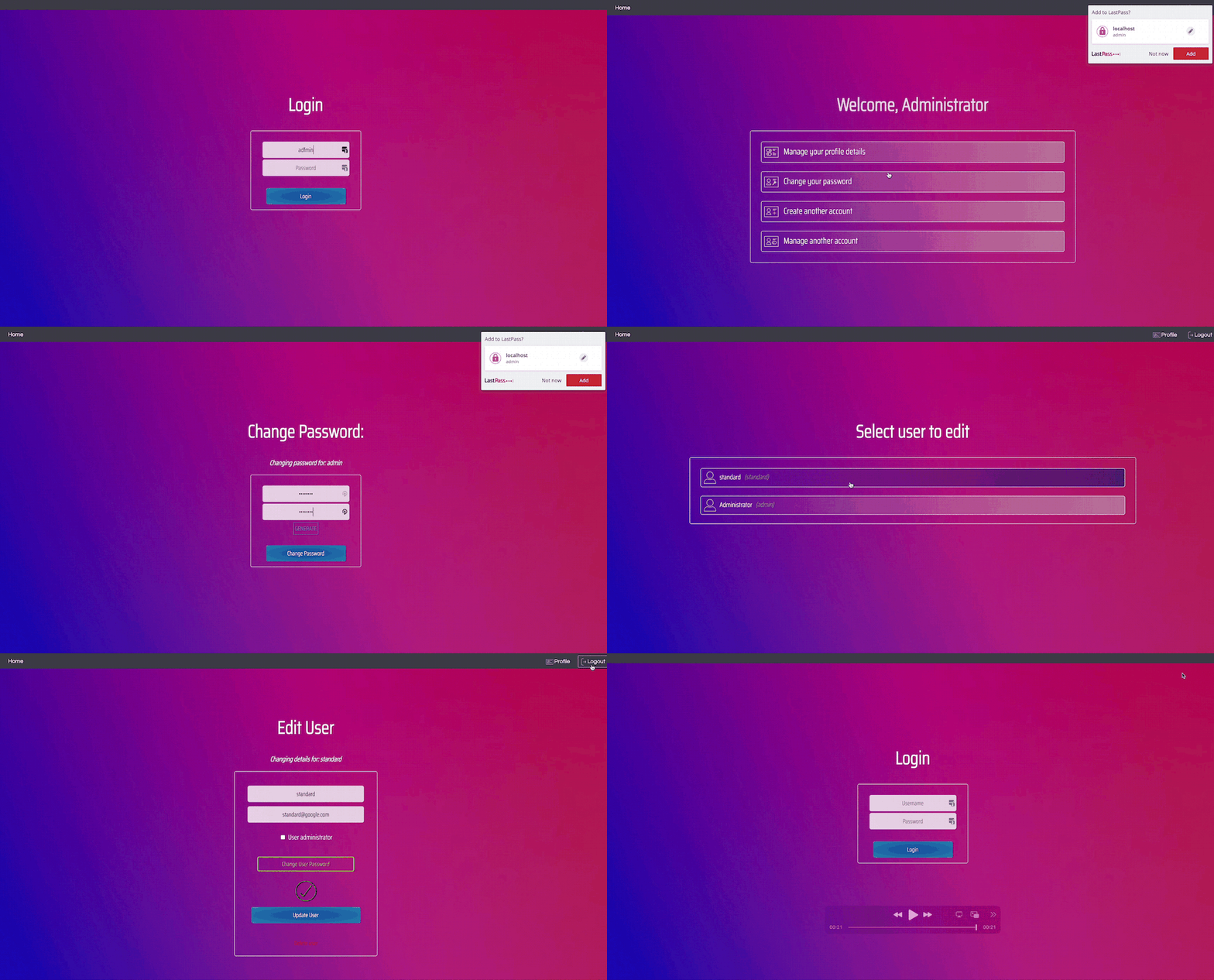
Demo:
Authentication
There were some basic security measures I achieved with this:
Secure Password storage
- User’s passwords should be salted: salts are generated by Python’s secrets function for security.
- Hashing should be strong but efficient: sha3_512 was used to hash passwords and hashing times are displayed in debug logs. On my machine, hashing passwords took an average of 0.0003 seconds
Providing cookie/token based authentication
Users entering their actual password should be minimized:
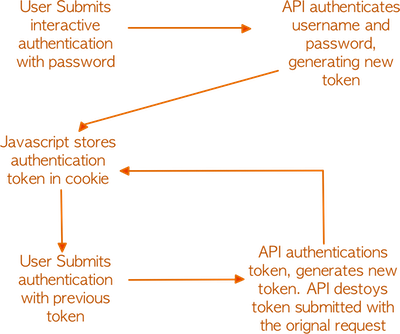
- On each successful authentication by password interactive, a the API provides a token which the user can use on their next authentication, instead of needing to enter their password
The API should have a mechanism for users to authenticate with a cookie:
- This can be done by storing the above mentioned token in a browser cookie
Token spoofing should not be possible:
- Each time the user authenticates with their current token, the browser provides a new token. Tokens are one time use only. If the user successfully authenticates to the API with a token, that token is then destroyed in the database
The result is that users can authenticate via a token or password but every authentication attempt must submit their username.
Combined with Javascript, the flow of authentication ends up as a following
Inactive users should timeout browser session
- When a new cookie is generated, it has a default timeout of 2 hours. With every authenticated request, a new token is generated, extending that user’s session for another 2 hours (configurable). However, if a token is submitted as part of an authentication request and it is found to be expired, the user will then be prompted to sign in via interactive authentication.
Front end
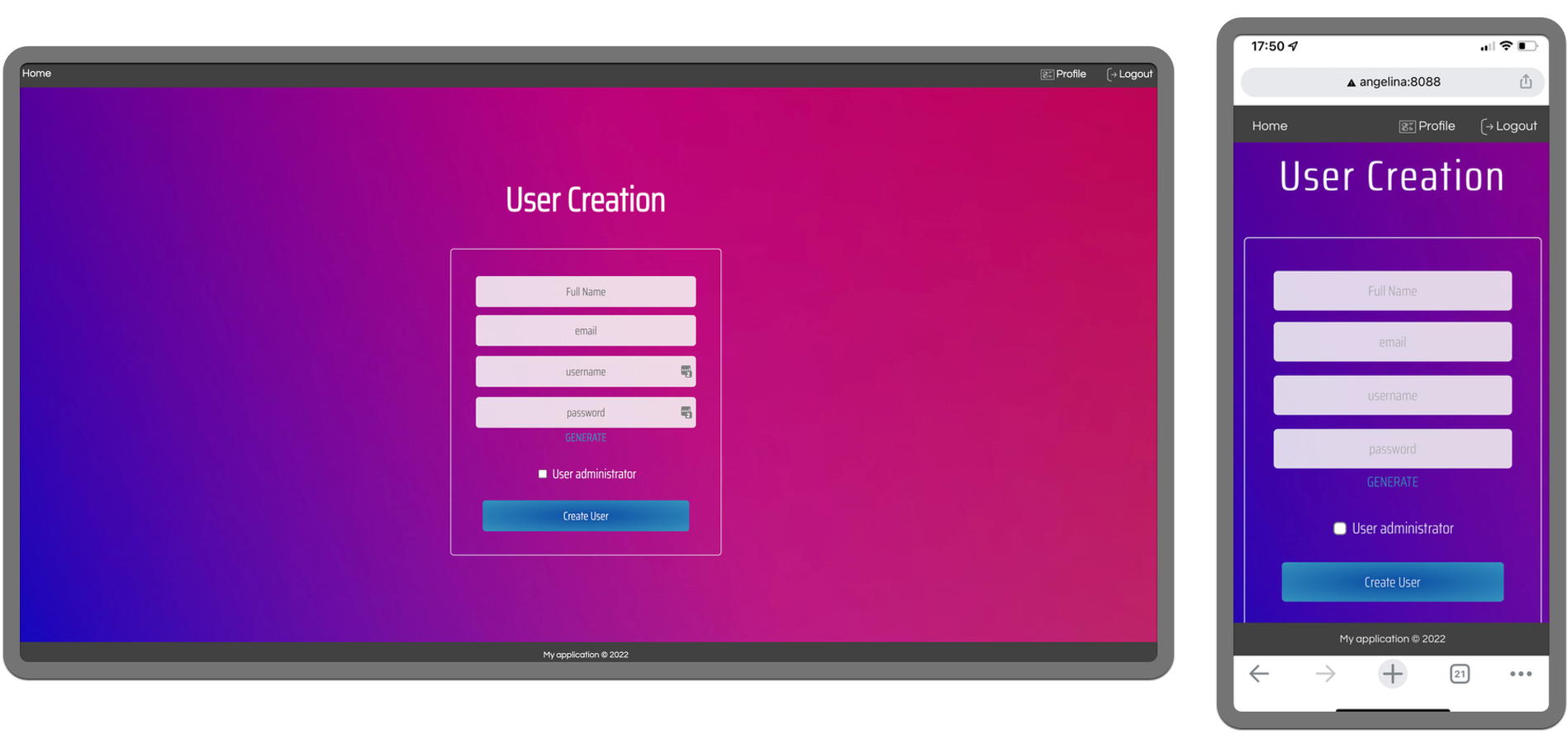
The front end is a combination of HTML, CSS and Javascript. The UI was also designed to be mobile-friendly:
API
The API is served from a docker container running Flask. Using an Apache container, a reverse proxy is used so that all requests to the API are over HTTPs.
Although this is effective, I found some limitations in taking this approch:
- The Flask application see’s requests coming from the IP of the docker container running the Apache proxy. This makes it very difficult to determine the computer that actually made the API request. As such, there is nothing that can be done within the API to determine the IP where users are authenticating from. To fix this, a future improvement could be to include the source IP in the authentication headers but this could be manipulated by client so there is still a limitation that this does not provide an accurate source of truth.
- Due to being behind a reverse proxy, CORS has to be enabled in Flask. Read More
Role Based Access Control (RBAC) from the API
Role based access can be enforced when a user makes a request via the API. For a user to authenticate, they must submit password or token and the username. Before evaluating what roles are required, the API will attempt to authenticate using the submitted authentication data. This verifies the user making the request before attempting any database changes. At that point, the API uses a secondary field submitted with the request to evaluate the user that should be changed.
If the authenticated user making the request matches the user requested for change, then no role based access is required. If they differ, then the API will evaluate roles users have. The advantage of this is that API calls which require changes to a user account can be combined into one namespace. The logic for this can be seen below:
if json.loads(authentication)["username"] != requested_user:

   # user has role returns true or false
   if not user_has_role(userid=json.loads(authentication)["username"], query_role="user_admin"):
       return_result["failure_reason"] = "user_insufficient_privelleges"
       return_result["result"] = "fail"
docker/api/python/api_server.py
Consistent return fields
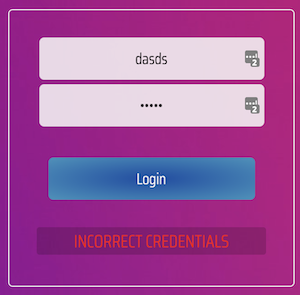
The API will always return a field named result which displays either success or fail. If fail an additional field failure_reason is provided when API calls fail. This makes it easy to print errors to screen, as these are generated on the server side. We can then put these errors to the user as seen below:
API functions:
The below API calls were created to offer basic functionality in the webUI. It was educational to discover how many API calls needed to be created just to offer basic user functionality
| Call | Function | Requirements |
|---|---|---|
/auth/login |
Logs in user with credentials passed in header “auth” | Valid username & password |
/auth/logout_cookie |
Removes a user’s token from their records so it cannot be reused | Must have submitted a valid token in headers |
/user/details/me |
Provides a dictionary with user information contained in “result_data” | Must have a submitted a valid token in tokens |
/user/details/get |
Provides a dictionary with user information contained in “result_data” | If the user ID with authentication doesn’t match requested user, must have user_admin role |
/user/change/password |
Changes user password with new password submitted in header | If the user ID with authentication doesn’t match requested user, must have user_admin role |
/user/create |
Creates a new user | User must have the “user_admin” roles |
/user/edit |
Updates submitted fields for user | If the user ID with authentication doesn’t match requested user, must have user_admin role |
/user/list/all |
Lists username and fullnames for all users | User must have the “user_admin” roles |
/user/delete |
Deletes a user | Cannot delete user “admin”. If the user ID with authentication doesn’t match the requested user, must have user_admin role |
EOF

Conclusion:
I believe this project demonstrates my ability to focus on good security practices when building a web application. It was also important for me to structure code in a modular fashion so that the project can be added to in the future. I feel the main improvement for the project would be to make use of additional libraries that can generate time based 2FA codes so that 2FA can be built into the UI. The main advantage of having authentication backed by an API is that authentication could be driven by any application which supports HTTP requests and not just Javascript.
It should be noted, I am by no-means suggesting the security decisions made here are ‘foolproof’ but they do protect from trivial web-based attacks. The project was also used to advance my personal development.