


Knowledge Required: Minimal
Tools required: Defender for Endpoint
EDR continues to be the Swiss Army Knife of an analyst, collecting valuable telemetry on an immense scale. Today we’re going to use Defender’s telemetry and the power of KQL to look for a commonly overlooked risk; insider threat.
Today’s query uses two main components of Defender’s telemetry to detect if somebody is exfiltrating by physical USB media. The tables used to achieve this:
- DeviceEvents: This table (amongst many other event types) has the ability to log when a USB device is inserted. Not only that, but it also picks up the device vendor and device ID and this fidelity will allow us to identify when a specific device model of USB stick is connected for the first time.
- DeviceFileEvents: Fairly self explanatory and logs all file related activity. Thus, if a user copies a load of files to a USB drive, that data will show in here
Typically, if somebody is doing something with malicious intent, it will be done swiftly and so we can query across these two tables looking for when somebody inserts a new USB device for the first time and copies a series of files in that same time window.
Typically, if somebody is doing something with malicious intent, it will be done swiftly and so we can query across these two tables looking for when somebody inserts a new USB device for the first time and copies a series of files in that same time window.
It’s possible that such activity could be legitimate so that’s why today’s query is a threat hunt, however, the query does come with some useful parameters for excluding false positives:
- LookBackPeriod: use this to adjust how long you’d like to look for devices being connected for the first time. By default it’s set to 14 days, but extend this if you’re finding that users are commonly using the same USB device(s) to copy files
- DetectionPeriod: this controls the time period where file transfer activity is searched over. This is set to 1d but should be guided by how often you’re going to run this threat hunt. Note that the lookback period should always be longer than the detection period
- DeviceConnectedCopiedWindow: The timeframe between when a device is inserted for the first time and then files are copied. As mentioned above, this is likely to be in quick succession if the intent it malicious, so this is set to 1 hour. However, you could extend it to generate more query result if you wanted to look for what is likely to be more ‘general activities’
- SystemDrive: this list is what determines files being copied from a system drive to a non-system drive. If your organisation uses a different drive labelling convention, add them to this list
Threat hunting results show the device involved, where files have been copied to and the time window involved
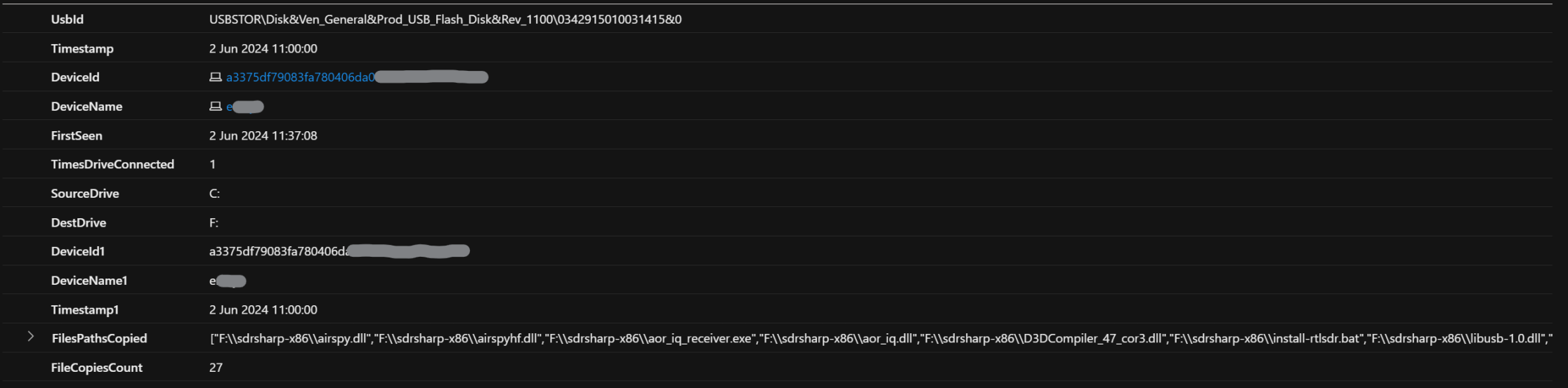
The query
let LookBackPeriod=14d; // How long to look back for USB activity
let DetectionPeriod=1d;
let DeviceConnectedCopiedWindow=1h; // adjust to have a longer time range between device connected and files copied
let SystemDrive=dynamic(['C:', 'D:']); // add known system drive paths in here
DeviceEvents
| where Timestamp > ago(LookBackPeriod)
| where ActionType contains "PnpDeviceConnected"
| extend DeviceType = tostring(todynamic(AdditionalFields).ClassName)
| extend UsbId = tostring(todynamic(AdditionalFields).DeviceId)
| where DeviceType contains "drive" or DeviceType contains "disk"
// get a count of how many times that USB vendor and id has been inserted (this just identifies the type of device and is not a unique ID per USB device)
// bin our timestamp so we can join on this time window when searching for USB events
| summarize FirstSeen=min(Timestamp), TimesDriveConnected=count() by UsbId, bin(Timestamp, DeviceConnectedCopiedWindow), DeviceId, DeviceName
| where FirstSeen > ago(DetectionPeriod)
// do a join to get copied files from the host that occur within the same timeeframe
| join (DeviceFileEvents
    | where Timestamp > ago(DetectionPeriod)
    | where ActionType == "FileCreated"
    | where FileOriginReferrerUrl contains @"\" // file has come from a windows path
    | extend SourceDrive=tostring(split(FileOriginReferrerUrl, @"\")[0]) // get the drive letter of the system path
    | extend DestDrive=tostring(split(FolderPath, @"\")[0]) // get the drive letter of where the file was written to
    | where SourceDrive has_any (SystemDrive) and not(DestDrive has_any (SystemDrive)) // a copy off the system drive
    | summarize FilesPathsCopied=make_set(FolderPath, 1000), FileCopiesCount=count() by SourceDrive, DestDrive, DeviceId, DeviceName, bin(Timestamp, DeviceConnectedCopiedWindow))
    on DeviceId, Timestamp
EOF
