


Knowledge Required: Familiarity with KQL
Full Credit goes to Yuval Gordon at Akamai for discovery of this. This post is a summarisation and an extension of their initial article: BadSuccessor: Abusing dMSA to Escalate Privileges in Active Directory
Windows Server 2025 was released last year. With it, came a brand new account type: Delegated Managed Service Accounts, dMSA. dMSA accounts are designed as a more secure approach to service accounts with the headlining features being self-rotating password management and the ability to lock access down to specific computers within Active Directory.
However, with the introduction of this account type came a method of abusing it. Dubbed ‘BadSuccessor’, Yuval Gordon within Akamai discovered an interesting attribute within dSMA accounts which is used when migrating a legacy account to the new dSMA type. Attribute ‘msDS-ManagedAccountPrecededByLink’ is used to ‘reference’ back to the legacy account that gets superseded by the dMSA account. As part of this behaviour the new dSMA account inherits all permissions and membership from whatever account is in this attribute to support a seamless transition.
As observed in the Akamai article, this behaviour introduces a security risk, allowing an attacker to potentially do the following:
- Create a new dMSA account
- Set the msDS-ManagedAccountPrecededByLink to any account within Active Directory (such as one with high privileges) causing the dMSA to inherit
- Start abusing the dMSA by initiating the migration wizard, a phase where Active Directory automatically ’trusts’ any computer attempting to use it.
Non-admin users can also perform this attack
Detection
The detection section of the Akamai article lists some great ways to detect abuse and access of dMSA. So of course, I spun up a Windows Server 2025 server, and promoted it to a Domain Controller.
The server has the following logging capabilities:
- Defender for Endpoint (MDE) Advanced Hunting
- Windows Security Events connected to Sentinel via the Azure Monitor Agent using ‘All’ level of logging as ‘Common’ did not seem to capture everything required. Note the - Server had auditing configured inline with Audit Policy Recommendations.
- A custom SACL (System Access Control List) on the ‘Managed Service Accounts’ container in Active Directory - see below for configuration steps.
Creation of dMSA
Defender for Endpoint - with extraction of newly created account
The below query will detect when PowerShell is used to create an account:
DeviceEvents
| where ActionType == @"PowerShellCommand"
| extend PwShCommand=tostring(todynamic(AdditionalFields).Command)
| where PwShCommand has_all('New-ADServiceAccount', 'CreateDelegatedServiceAccount')
| extend CreatedAccountName = extract(@'-Name(\s"|\s)([^"|\s]+)', 2, PwShCommand)
| extend CreatedAccountDNSHostName = extract(@'-DNSHostName(\s"|\s)([^"|\s]+)', 2, PwShCommand)
Recommended action: confirm activity against the account associated with the returned process, identifying any indicators of compromise
Active Directory Logging
Note: do not be fooled like me in looking for Event ID 4720 (an account was created) … dMSA creation showed under 4741 (A computer account was created). I opted not to use Event ID 5137 on this occasion (A directory service object was created) because this requires a SACL to be created.
SecurityEvent
| where EventID == 4741
I’ll be the first to admit the above is overly generic, however, the returned event(s) emits ‘TargetUserName’ as a field.
Recommended action: cross reference the ‘Managed Service Accounts’ to see if a matching account name has been created.
Enumeration of dMSA
For MDE monitored devices, LDAP searches are logged. Therefore, we can pickup on LDAP enumeration for dMSA via the logged field ‘Distinguished Name’. This searches over the past 1 day, using the previous 7 days of logs as a baseline and highlights any new programs searching LDAP for a specific dMSA:
let DetectionWindow=1d;
let BaselineAgo=7d;
DeviceEvents
| where Timestamp > ago(BaselineAgo)
| where ActionType == @"LdapSearch"
| extend DistinguishedName=tostring(todynamic(AdditionalFields).DistinguishedName)
| where DistinguishedName contains "CN=Managed Service Accounts"
| summarize arg_min(Timestamp, *) by DeviceId, InitiatingProcessFileName, DistinguishedName // take the earliest interaction
| where Timestamp > ago(DetectionWindow)
Recommended actions: confirm if the device in question uses the dMSA account; the software in question is likely to run LDAP searches; and that there is no suspicious activity associated with the user initiating the process
Modified Attributes of dMSA
In order to log this, as the article explains, we will need to set a A SACL (System Access Control List) on the ‘Managed Service Accounts’ container within Active Directory. To do this:
- run ‘ADSIEdit.msc’ with administrator privileges on a domain controller
- Under ‘CN=Managed Service Accounts’ right click ‘Properties’
- Select the ‘Security’ tab
- Select ‘Advanced’
- Selected the ‘Auditing’ tab
- Select ‘Add’
- For ‘select a Principal’, click on it and type ‘Everyone’ and hit ‘OK’
- Under permissions, ensure ‘Write all properties’ is checked
It took me 5-10 minutes for the changes to be reflected and for logs to be ingested into Sentinel
Active Directory - Look for a dMSA account migration state change:
SecurityEvent
| where EventID == 5136
| where EventData contains @'<Data Name="ObjectClass">msDS-DelegatedManagedServiceAccount</Data>'
| where EventData contains @'<Data Name="AttributeLDAPDisplayName">msDS-DelegatedMSAState</Data>'
| extend AttributeState = extract(@'<Data Name="AttributeValue">(.+)<', 1, EventData)
| extend AttributedMSAState=case(AttributeState == "1", "Migration in progress", AttributeState == "2", "Migration completed", AttributeState == "3", "Standalone", "Unknown")
The attribute value gives away the state so we turn this into a reader-friendly version with the field ‘AttributedMSAState’
Recommended actions: confirm with the service account owner if the activity is intentional. Disable the account if it is not recognised and look for suspicious activities around its creation.
Active Directory - Look for changes to ‘msDS-ManagedAccountPrecededByLink’
SecurityEvent
| where EventID == 5136
| where EventData contains @'<Data Name="ObjectClass">msDS-DelegatedManagedServiceAccount</Data>'
| where EventData contains @'<Data Name="AttributeLDAPDisplayName">msDS-ManagedAccountPrecededByLink</Data>'
| extend AttributeValue = extract(@'<Data Name="AttributeValue">(.+)<', 1, EventData)
| extend IsHighRisk=iff(Attributes contains "admin", true, false)
We can then look at the AttributeValue and determine if it is likely to be risky by looking for if it contains ‘admin’. You can of course tailor this to your environment.
Recommended Action: confirm with the service account owner that the ‘AttributeValue’ matches the account the dMSA is intended to replace
Wrapping Up
I strongly suspect Microsoft will look to introduce changes to the dMSA workflow that limit what accounts can be associated with the ‘msDS-ManagedAccountPrecededByLink’ attribute. Having been limited in my Azure testing, I would have liked to discover if the migration wizard can be ‘restarted’ against a dMSA. This would potentially allow somebody to add additional trusted machines as seen in the below diagram:
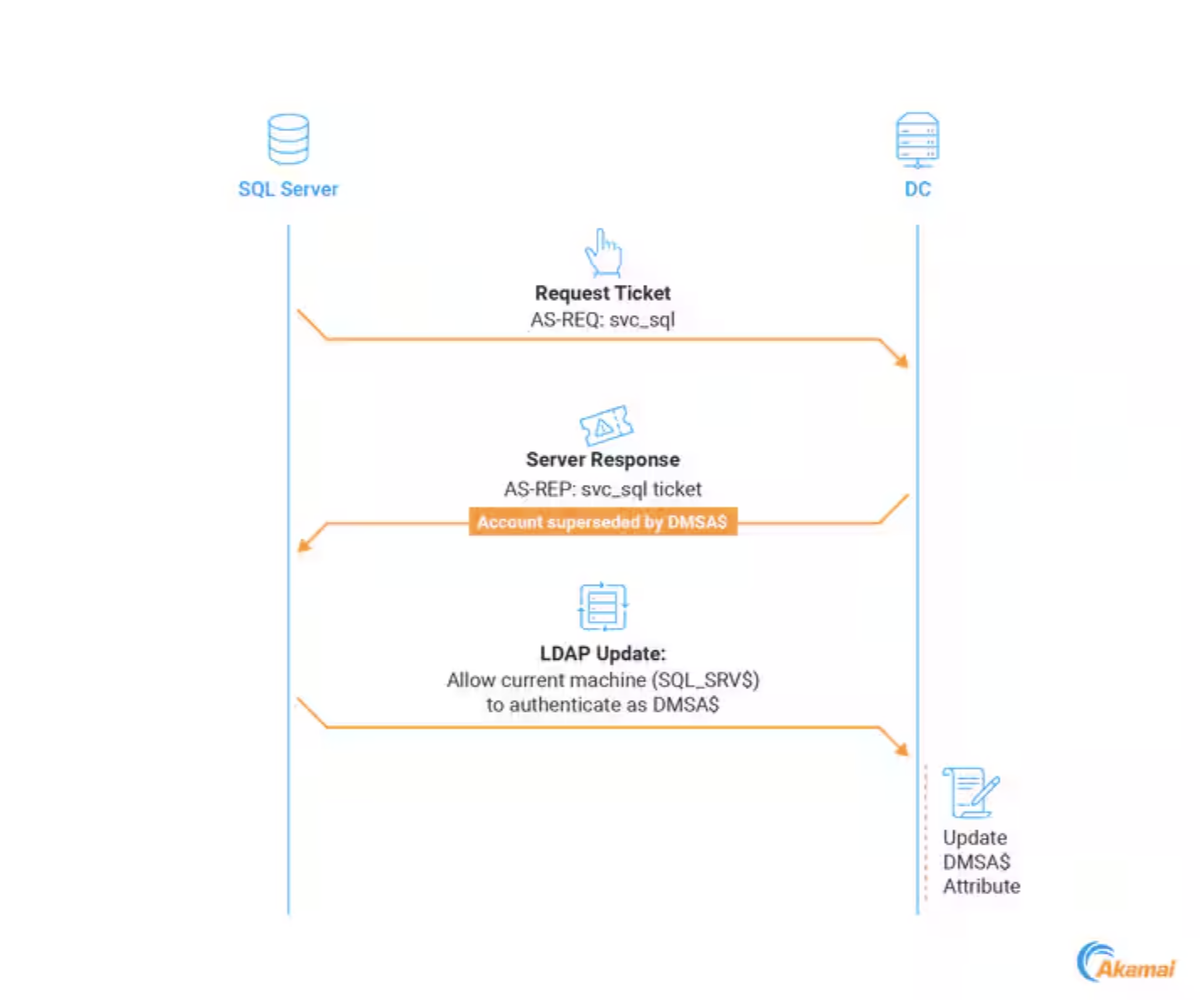
The queries highlighted in this post can continue to be used beyond an anticipated patch by Microsoft. The introduction of service accounts typically means they have higher privileges than standard users and thus require a closer level of monitoring. To see which users (including potentially unprivileged ones) can likely create dMSA’s in your environment, Akamai has provided a helpful script. It’s recommended to review the output, reduce permissions where possible and potentially enable enhanced monitoring on surfaced accounts.
EOF
